Search Rapidshare for Valid Files in Real time [Crawler]

Posted by Shashank Krishna Sunday, April 19, 2009

I have told you in the past about many rapidshare file searchers.What these search engines do is to actually search through Google database for the files and show them to the users.This searches from rapidshare can bring you a ton of results but many these files will be deleted due to lack of not downloading for many days.

Today I found out a new rapidshare search engine which actually searches only for valid files from rapidshare database.This Rapidshare crawler uses scripts to check whether a file is valid or not.

“CrawlRapidShare is the first Rapidshare real time crawler , we don't use any obsolete databases like other search engines , we crawl the web in realtime per search query with our particular technology so we always give you fresh results , also we have the ability to check the validity of links in real time or by Rapidshare tools.” says the new rapidshare crawler

latest rapidshare search engine

Rapidshare crawler engine also have provided an option to check links validity,but this can consume a bit more time.I recommend you to search first and then check the files by clicking the “check validity of all the links in this page by rapidshare.com tools” as shown below.

rapidshare link verifier

Use this latest rapidshare search engine and post your results in the comments on how effectively it can get your files.

Rapidshare is almost a legend in public file hosting business in Internet. It’s really hard to find a dedicated internet user or semi dedicated user , who hasn’t heard the name rapidshare. Actually not only ,Rapidshare but also Megaupload is another Guru in this business. Thousands of files stored in these public servers by users all over the internet makes these sites something special. Though, it’s declared that , if you share any warez, illegal software, copy right protected item in those servers, and they get a complain against that , then files will be deleted at once. But heck ! There are millions of files and links are distributed in thousands of sites / networks. So its really hard to trace all the illegal files. Almost maximum warez servers live on this public download servers like rapidshare.

Hey , do you know another business is going on regarding rapidshare or megaupload ? its the premium account business. You may have experienced the necessity of having aBeware of cheating ! rapidshare premium account. Some smart people are exploiting this issue . Since Rapidshare gives some free premium accounts, some people posted article, blogs or posts telling that they are distributing free accounts. Not only this , some are saying that , they have a huge list of hacked rapidshare premium account. They give you a text file link which is located in rapidshare server itself. well how many of you got that given user login working ? Myself is not lucky enough to get those free accounts :( Actually many of users are helping some users to grab premium hours beyond their knowledge .

How it is ?You may have heard that the more the file you have uploaded is downloaded , the more premium points will you get. So what’s worthy like cheating people by saying about free premium accounts ! well , I am not telling all tricks are useless. Some of them are important. Tricks like eliminating waiting time by a JavaScript code or IP barrier by /ipconfig flushdns , /ipconfig renew ,/ipconfig release all these commands ( it worked in ancient days , you know :D). But Rapidshare is always changing their policy to cope up with fastest brain of hackers. So you can’t be sure that , tricks you are using today will work tomorrow. Rapidshare is also a very common policy for blog writers to attract traffic . A blog title like “Latest Rapidshare Hacks” will bring a hell of traffic in your site. And who cares if you give them a hack which is obsolete for years. And interestingly , all the rapidshare premium hunter about whom I have told earlier, also make anonymous comments on these posts giving links of their uploaded “zoombie ( yes I would like to call it so ) file”.

So far I have found only one satisfactory solution to this rapidshare premium problem. Though i’m afraid this is not easy for everyone. You may have heard about rapidleech , a free server transfer script , allows you to download rapidshare (with some other major file sharing sites) files to your faster server, and then you can download files from your server to pc , at your convenient time. But main problem is , you are assumed to have a fast box connection with proper access. Remember , this requires (rapidleech) only PHP , nothing else ( i mean mysql or stuffs). so , think twice before downloading a long login list for rapid premium. May be you are helping some one to help his premium period unconsciously, and more importantly someone is cheating you , exploiting you.

hOW TO HIDE DRIVES IN UR COMPUTER

Posted by Shashank Krishna

This is a great trick you can play on your friends. To disable the display of local or networked drives when you click My Computer.

1.Go to start->run.Type regedit.Now go to:
HKEY_CURRENT_USER\Software\Microsoft\Windows\CurrentVersion\Policies\Explorer

2.Now right click in the right pane

3.create a new DWORD item and name it NoDrives (it is case sensitive).

4.Now modify it's value and set it to 3FFFFFF (Hexadecimal) .

5.Now restart your computer.

6.So, now when you click on My Computer, no drives will be shown(all gone...).

7.To enable display of drives in My Computer, simply delete this DWORD item that you created.

8.Again restart your computer.

9.You can now see all the drives again. Magic........lol....

please comment here regarding the trick and subscribes to this post so as to remain updated about the blog..............

How to trace an IP address from an Email

Posted by Shashank Krishna

Here’s a quick how-to guide on how you can track email to it’s originating location by figuring out the email’s IP address and looking it up. I have found this to be quite useful on many occasions for verification purposes since I receive lots of emails daily due to my blog. Tracking the IP address of an email sender does require looking at some technical details, so be ready to dig your heels in!

There are basically two steps involved in the process of tracking an email: find the IP address in the email header section and then look up the location of the IP address.

Finding the IP address of an email sender in GMail, Yahoo Mail, and Outlook

Let’s go ahead and take a look at how you would do this for Google, Yahoo andOutlook since those are the most popular email clients.

Google’s Gmail

1. Log into your account and open the email in question.

2. Click on the down arrow that’s to the right of the Reply link. Choose Show Original from the list.

track emails

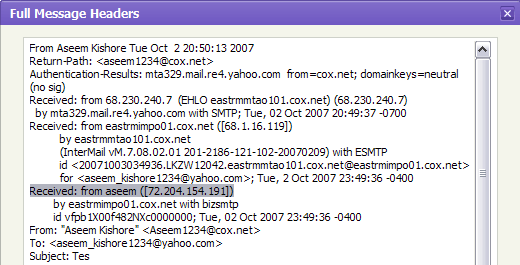
Now here’s the technical part that I was telling you about earlier! You need to look for the lines of text that start with “Received: from“. It might be easier to simply press Cntrl + F and perform a search for that phase. You’ll notice that there are several Received From’s in the message header. This is because the message header contains the IP addresses of all of servers involved in routing that email to you.

message header

To find the first computer that originally sent the email, you’ll have to find the Received From that’s farthest DOWN. As you can see from the above image, the first one is from a computer called “aseem” with the IP address 72.204.154.191. Then it was routed to my ISP’s server ateastrmmtao104.cox.net and so on and so forth till it got to your email server.

The computer aseem is my personal home computer and that’s my public IP address for my house! I’ll go through Yahoo and Outlook before talking about tracking the location of that IP address.

Yahoo Mail Beta

1. Log into your account and open the email (if you’re using Yahoo Mail Beta with the new preview interface, make sure you double-click on the email so that it opens in a new tab)

2. At the top right, you’ll see there is a drop-down option where Standard Headeris selected by default.

3. Click on it and choose Full Header.

yahoo header

Again, you’ll see the same information as before, just in a different window:

message headers

Microsoft Outlook

1. Open the email in Outlook by double-clicking on it

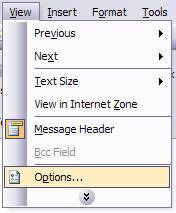
2. Go to View at the top menu (the menu options for the email, not the main Outlook window) and choose Options.

outlook message headers

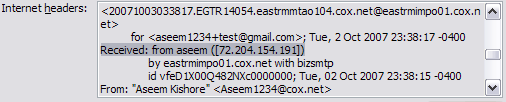
You’ll get a dialog box where you can set the message options and at the bottom you’ll see the Internet Headers box. For some silly reason, the box is very small and you have to scroll a lot, so it’s best to simply copy and paste the text into Notepad to view it more easily.

internet headers

Tracking the location of an IP address

Now that we have our originating IP address of 72.204.154.191, let’s find out where that is! You can do this by perform a location lookup on the IP address. My favorites are IP2Location and GeoBytes IP Locator.

GeoBytes gave me a big map of New Orleans, LA along with a bunch of other information about the location itself.

find ip address location

IP2Location also gave me the same information pretty much, including the ISP (Cox Communications). Of course, this is correct since I live in New Orleans!

If you want more information, you can do a WHOIS database search also. My favorite one is the ARIN WHOIS Database Search. This will give you information on who hosts that IP address and their registration information. You can always contact them to try and find more information on that particular IP address.

Notepad tricks...

Posted by Shashank Krishna

~!~!~!~ Trick#1 ~!~!~!~
1. Open a blank Notepad file
2. Write .LOG as the first line of the file, followed by a enter. Save the file and close it.
3. Double-click the file to open it and notice that Notepad appends the current date and time to the end of the file and places the cursor on the line after.
4. Type your notes and then save and close the file.

After that open the file and see the changes.
by this trick u can also use ur notebook as a personal diary.


~!~!~!~ Trick#2 ~!~!~!~

1.open notepad
2. type "bush hid the facts"
3. save it and close it...
4 then open it again........n see the changes...............


~!~!~!~ Trick#3 ~!~!~!~
Do you know the number of the flight that was used to attack the world Trade Centre????
The flight number was Q33N.

Now, open your Notepad, type the number of the flight (i.e. Q33N).
Now click on format>font, increase the font size upto 72, and change the font style to 'wingdings'. Now see the ammmaaazzzing thing.

~!~!~!~ Trick#4 ~!~!~!~
Over at WinCustomize, someone thought they'd found an Easter Egg in the Windows Notepad application. If you:
1. Open Notepad
2. Type the text "this app can break" (without quotes)
3. Save the file
4. Re-open the file in Notepad

Notepad displays seemingly-random Chinese characters, or boxes if your default Notepad font doesn't support those characters.

It's not an Easter egg (even though it seems like a funny one), and as it turns out, Notepad writes the file correctly. It's only when Notepad reads the file back in that it seems to lose its mind.

How to change your MAC address,...

Posted by Shashank Krishna

Method 1:
This is depending on the type of Network Interface Card (NIC) you have. If you have a card that doesn’t support Clone MAC address, then you have to go to second method.
Go to Start->Settings->Control Panel and double click on Network and Dial-up Connections.
Right click on the NIC you want to change the MAC address and click on properties.
Under “General” tab, click on the “Configure” button
Click on “Advanced” tab
Under “Property section”, you should see an item called “Network Address” or "Locally Administered Address", click on it.
On the right side, under “Value”, type in the New MAC address you want to assign to your NIC. Usually this value is entered without the “-“ between the MAC address numbers.
Goto command prompt and type in “ipconfig /all” or “net config rdr” to verify the changes. If the changes are not materialized, then use the second method.
If successful, reboot your systems.

Method 2:
This method requires some knowledge on the Windows Registry. If you are not familiar with Windows Registry, just use the
SMAC tool to change the MAC addresses, or consult with a technical person before you attempt on the following steps. Also, make sure you have a good backup of your registry.
a. Goto command prompt and type “ipconfig /all”, and
I. Record the Description for the NIC you want to change.
II. Record the Physical Address for the NIC you want to change. Physical Address is the MAC Address

figure 1.
b. Goto command prompt and type “net config rdr”, and you should see something like


figure 2.
c. Remember the number between the long number (GUID) inside the { }. For example, in the above “net config rdr” output, for MAC address “00C095ECB793,” you should remember {1C9324AD-ADB7-4920-B02D-AB281838637A}. You can copy and paste it to the Notepad, that’s probably the easiest way. (See figure 2.)
d. Go to Start -> Run, type “regedt32” to start registry editor. Do not use “Regedit.”
e. Do a BACKUP of your registry in case you screw up the following steps. To do this
I. Click on “HKEY_LOCAL_MACHINE on Local Machine” sub-window
II. Click on the root key “HKEY_LOCAL_MACHINE”.
III. Click on the drop-down menu “Registry -> Save Subtree As” and save the backup registry in to a file. Keep this file in a safe place.
f. Go to “HKEY_LOCAL_MACHINE\SYSTEM\CurrentControlSet\Control\Class\{4D36E972-E325-11CE-BFC1-08002BE10318}. Double click on it to expand the tree. The subkeys are 4-digit numbers, which represent particular network adapters. You should see it starts with 0000, then 0001, 0002, 0003 and so on. (See figure 3.)

Figure 3

g. Go through each subkey that starts with 0000. Click on 0000, check DriverDesc keyword on the right to see if that's the NIC you want to change the MAC address. The DriveDesc should match the Description you recorded from step (a.-I.). If you are not 100% sure about the DriverDesc, then you can verify by checking if the NetCfgInstanceID keyword value matches the GUID from step (c). If there is no match, then move on to 0001, 0002, 0003, and so on, until you find the one you want. Usually 0000 contains the first NIC you installed on the computer.In this demonstration, 0000 is the NIC I selected. (See figure 3.)
h. Once you selected the subkey (i.e. 0000), check if there is a keyword "NetworkAddress" exist in the right side of the window. (See figure 3.)
I. If "NetworkAddress" keyword does not exist, then create this new keyword:
i. Click on the drop down menu “Edit -> Add Value”.
ii. In the Add Value window, enter the following value then click OK. (See figure 4.) Value Name: = NetworkAddress Data Type: = REG_SZ

Figure 4.
iii. String Editor window will pop up at this time (see figure 5.)
iv. Enter the new MAC address you want to modify. Then click OK. (There should not be any "-" in this address. Your entry should only consist of 12 digits as seen in the figure 5.)
II. If "NetworkAddress" keyword exists, make sure it shows the keyword type is REG_SZ, and it should show as NetworkAddress:REG_SZ: . This keyword might not have a value at this time.
i. Double click on the keyword NetworkAddress and the String Editor window will pop up. (See Figure 5.)
ii. Enter the new MAC address you want to modify. Then click OK. (There should not be any "-" in this address. Your entry should only consist of 12 digits as seen in the figure 5.)


Figure 5.
j. There are 2 ways to make the new MAC address active. Method I does not require a system reboot:
I. Goto Start->Setting->Control Panel, and double click on "Network Neighborhood". WARNING: Make sure you understand that you WILL lose the network connection after completing step "ii." below, and if you have a DHCP client, you will get a new IP address after completing step "iii."
i. Select the Network Adaptor you just changed the MAC address.
ii. Right click on the selected Network Adaptor and click "Disable." Verify the status column for this adaptor changes to "Disabled"
iii. Right click on the selected Network Adaptor and click "Enable." Verify the status column for this adaptor changes to "Enabled"
iv. If for any reason it cannot be disabled or re-enabled, you have to reboot your system to make the changes effective.
II. Reboot your Windows system.
k. Once completing step j (if rebooting the system, wait until the reboot is completed), go to command prompt, type “ipconfig /all” to confirm the new MAC address.

Restore The TRUE Hardware burned-in MAC Address:
Remove the entry you added:
If you followed Method 1, then go back to the advanced properties window and remove the entry you add.
If you followed Method 2, then remove the "NetworkAddress" keyword you added in the registry.
Use step (j) above to activate the change you make.
Once rebooted, go to command prompt, type “ipconfig /all” to confirm the original MAC address.

If MAC Address changes does not work:
If for whatever reason the MAC address cannot be changed using method 2, make sure you restore the registry setting by following the "Restore The TRUE Hardware burned-in MAC Address" instruction above. If necessary, restore the registry you just backed-up to get your system back to the original state. You can do this by clicking on the drop-down menu “Registry->Restore,” and restore your backup registry file.

Resident Evil 5 download[mediafire]..best fps game of the year..

Posted by Shashank Krishna Saturday, April 18, 2009


Software Info

Published by:
Capcom

Developed by:
Capcom

Genre:
Action
Third Person Action

Related Websites:
Official Site
Dev/Pub
1up.com Resident Evil 5 Overview

General Description

The biohazard threat has not ended: Just when it seemed that the menace of Resident Evil had been destroyed, along comes a new terror to send shivers down player’s spines. Chris Redfield, returning Resident Evil hero, has followed the path of the evil literally around the globe. After joining a new organization, Chris heads to Africa where the latest bioterrorism threat is literally transforming the people and animals of the city into mindless, maddened creatures. Chris must take on the challenge of discovering the truth behind this evil plot. In Resident Evil 5, Capcom will teach players to fear the daylight as much as they have feared shadow in previous games.

Co-producer and series veterans Jun Takeuchi (Lost Planet) and Masachicka Kawata (Resident Evil 4 Wii Edition, Resident Evil: Umbrella Chronicles) unleashes an unprecedented level of fear for the next generation in Resident Evil 5, the sequel to one of the highest-rated videogames in history, according to Metacritic.com and Gamerankings.com. Promising to revolutionize the series by delivering an unbelievable level of detail, realism and control, Resident Evil 5 is certain to bring new fans to the series. New technology developed specifically for the game, as well as incredible changes to both the gameplay and world of Resident Evil will make this a must-have game for gamers across the globe.

The latest in the Resident Evil series, which has sold over 34 million units since the original game was released in 1996, as well as spawned a multi-million dollar trilogy of films from Sony Pictures. Resident Evil 5 will revolutionize the Resident Evil series, just as Resident Evil 4 did.

Key features
• Chris Redfield, protagonist of the original Resident Evil and Resident Evil: Code Veronica, returns
• New environments and a diverse assortment of locations
• New enemies bring new challenges: speed and intelligence make adversaries as dangerous singly as they are in groups.
• An arsenal of weapons at the players command to keep the evil at bay, including knives, pistols, machine guns, sniper rifles and more.
• Lighting effects provide a new level of suspense in both harsh light and deepest shadow
• True high definition gaming on multiple game platforms, using an advanced version of Capcom’s proprietary game engine, MT Framework, which powered the next-gen, million-plus hit titles Devil May Cry 4, Lost Planet and Dead Rising.

Screenshots

The Pirate Bay found guilty, jail & $3.6 million fine....??

Posted by Shashank Krishna Friday, April 17, 2009


The four founders of The Pirate Bay, an online site for free sharing of music and films, were found guilty of contributing to copyright infringement and sentenced to one-year prison terms each.

Fredrik Neij, Gottfrid Svartholm Warg, Peter Sunde Kolmisoppi and Carl Lundstroem received their sentences in Stockholm today, according to a district court statement. The court estimates the damage done to copyright holders by The Pirate Bay to be 30 million kronor ($3.6 million), compared with the more than 100 million kronor claimed by prosecutors.

The news first surfaced from founder Peter Sunde who used Twitter to break the news. Sunde said "according to leaked information from the court we lost (got the news last night). Trustworthy source as well." Sunde is also insisting "nothing will happen to TPB, us personally or file sharing what so ever. This is just a theater for the media."


The four defendants named as Frederik Neij, Gottfrid Svartholm Warg, Carl Lundstrom and Peter Sunde have been sentenced to 1 year in prison for "aiding in copyright infringement" coupled with a fine of 30 million Swedish kronor (£2.4 million/$3.6 million).

A higher charge was dropped after shaky evidence at the beginning of the trial. The Motion Picture Association of America and the International Federation of the Phonographic Industry are among those who have called for action to shut down the site. Critics of the trial claim Swedish authorities caved in to pressure from the US film industry.

Members of The Pirate Bay have always stated that the site will remain safe regardless of legal action.


Music companies in the case, including EMI and Vivendi’s Universal Music Group, are seeking compensation of 2.2 million euros ($2.9 million)…

Increase Your Wi-Fi Signal Strength with an Aluminium foil

Posted by Shashank Krishna Wednesday, April 15, 2009


Are you looking for ways to increase the signal strength of that wireless router in your home without having to invest in a Wifi extender?

Then head over to the kitchen and grab a piece of shiny Aluminum foil that is normally used by mom for cooking or for wrapping sandwiches so that they stay fresh a little longer.


Instructions for How to Increase Wi Fi Wave with Aluminum Foil - video powered by Metacafe


Tear off some foil in the shape of a rectangle, give it a curve and then place the foil behind the antenna of your router. This will reflect the wireless signals into your preferred directions.

If the router is mounted on a wall, you can make holes in the Aluminium foil and insert it inside the antennas as shown in the above video.

Kosmix...a rival to google??

Posted by Shashank Krishna Thursday, April 2, 2009

Recently i stumbled upon this intriguing seach site...n it was awesome..
Some facts abouts are ...

KOSMIX, a well-financed Silicon Valley start-up, is often described on blogs and news sites as a search engine that may someday rival Google.

Kosmix is an American privately held company in Mountain View, California. The site Kosmix earns revenue from advertising related to its categorization engine. The engine organizes the Internet into topic pages allowing users to explore the Web by topic, "presenting a dashboard of relevant videos, photos, news, commentary, opinion, communities and links to related topics" . Venky Harinarayan and Anand Rajaraman founded Kosmix in 2005.

For a key word or topic that a user enters, "Kosmix gathers content from across the Web to build a sort of multimedia encyclopedia entry on the fly. By scouring the Web, the company has built a huge taxonomy, a set of nearly five million categories on topics from people and locations to car models, music groups and types of cheese. The taxonomy includes millions of connections mapping the relationship among those categories."

Kosmix launched a personal news site called MeeHive in March, 2008 which is similar to GoogleNews or MyYahoo!, but allows users to customize their interests to a greater degree.


Before you leave, please promote this article with your favorite bookmarking site using the Share/save button! AND DO please give your valuable comment
Share/Save/Bookmark
Subscribe

Are You Planning on Quitting Facebook? Why?

@Flickr

www.flickr.com

About Me

My Photo
Shashank Krishna
Bangalore, up, India
nothin much to say.........doin B.tech in IIIT allahabad loves bloggingn hacking.... :) and loooves blogging
View my complete profile

ads2

topads